| Navigation |
|
|
|
|
|
|
|
|
|
|
|
|
|
|
|
|
|
|
|
|
|
|
|
|
|
|
|
|
|
|
|
|
|
|
|
|
|
|
|
|
|
|
|
|
|
|
|
|
|
|
|
|
|
|
|
|
|
|
|
|
|
|
|
|

|
|
|
|
| |

VLC media player is a free software media player by the VideoLAN project.
It is a highly portable multimedia player, encoder, and streamer supporting many audio and video codecs and file formats as well as DVDs, VCDs, and various streaming protocols. It is able to stream over networks and to transcode multimedia files and save them into various different formats. VLC used to stand for "VideoLan Client", but that meaning is deprecated[1] [2].
It is one of the most platform-independent players available, with versions for Microsoft Windows, Mac OS X, BeOS, BSD, Windows CE, Linux, and Solaris, and is widely used with over 35 million downloads for version 0.8.6.[3]
VLC uses a large number of free decoding and encoding libraries. Many of its codecs are provided by the libavcodec codec library from the FFmpeg project, but it uses mainly its own muxer and demuxers. It also gained distinction as the first player to support playback of encrypted DVDs on Linux by using the libdvdcss DVD decryption library.
Input
UDP/RTP unicast or multicast, HTTP, FTP, MMS, DVDs, VCD, SVCD, CD Audio, DVB (Only on Linux and on Windows in development versions), Video acquisition (via V4l and DirectShow), RSS/Atom Feeds, and from files stored on your computer.
Container formats
3GP[13], ASF, AVI, FLV, MKV, QuickTime, MP4, Ogg, OGM, WAV, MPEG-2 (ES,PS,TS,PVA,MP3), AIFF, Raw audio, Raw DV, FLAC. MXF, and much more
Video formats
Cinepak, DV, H.263, H.264/MPEG-4 AVC, HuffYUV, Indeo 3[14], MJPEG, MPEG-1, MPEG-2, MPEG-4 Part 2, Sorenson (thus enabling direct playback of the modified Sorenson H.263 encoded videos downloaded from YouTube), Theora, VC-1[15], VP5[15], VP6[15], WMV and much more
Subtitles
DVD, SVCD, DVB, OGM, SubStation Alpha, SubRip, Advanced SubStation Alpha, MPEG-4 Timed Text, Text file, Vobsub, MPL2[16], Teletext[16]
Audio formats
AAC, AC3, ALAC, AMR[13], DTS, DV Audio, FLAC, MACE, MP3, QDM2/QDMC, RealAudio[17], Speex, Screamtracker 3/S3M, TTA, Vorbis, WavPack[18], WMA. and much more.
Output formats for streaming/encoding
VLC can transcode into several formats depending on the operating system.
Container formats
ASF, AVI, FLV[16], MP4, Ogg, Wav, MPEG-2 (ES, PS, TS, PVA, MP3), MPJPEG, FLAC, MOV and much more.
Video formats
H.263, H.264/MPEG-4 AVC, MJPEG, MPEG-1, MPEG-2, MPEG-4 Part 2, VP5[15], VP6[15], Theora, DV and much more.
Audio formats
AAC, AC3, DV Audio, FLAC, MP3[19], Speex, Vorbis and much more.
Streaming protocols
UDP, HTTP, RTP, RTSP, MMS, File
download here:

Just plug your guitar into the sound card input, start Guitar FX BOX and your guitar will scream and sing like you are using expensive analog effect pedals. You can apply a wide range of high quality effects to guitar, voice and other inputs. This high quality sound processing program is acting just like a good collection of guitar effects pedals. You can use several of them at the same time, even all if you need so.
Guitar FX BOX does REALLY real-time DSP. Signal is sampled from sound card input, processed and then send to the output with VERY LOW LATENCY. It's NOT like all those "real-time" DirectX plugins which outputs signal whole second or more after they received it. I/O delay with Guitar FX BOX is extremely low, virtually undetectable! This is achieved using DirectSound (or WDM streaming) for fast access to the hardware (sound card) and fast DSP algorithms optimized for real-time processing. Through DirectSound, latency is about 20ms with most sound cards, or even less. When WDM streaming driver is used, latency can go as low as 5ms! Nevertheless, exact total i/o latency still depends on hardware/drivers.
With program panel very descriptive, user interface intuitive and friendly, this is ultimate application for real-time effects processing. Any program option is just one or two mouse clicks away.
Everything is real-time, every slider move results in instant change of produced sound.
The "BOX" currently contains these high quality effects:
Overdrive/Distortion, Echo, Reverb, Chorus, Wah-wah (AutoWah & EnvelopeWah), Pitch shifter, Tremolo, I/O Bass/Mid/Treble EQ controls, Compression and Phaser. Also, handy guitar tuner included.
System requirements:
* 16-bit Sound card with drivers supporting DirectSound (win9x/Me) or WDM streaming (win 98/Me/2k/XP). Program should work with any 16 bit full duplex (or at least half duplex - like SB16/AWE32/64) sound card. Full duplex means that the sound card is capable of simultaneous recording and playback - this feature is present in most sound cards. However, the best results can be achieved with newer PCI sound cards.
* CPU Pentium 166 MHz Minimal. Pentium 300 MHz, or faster recommended.
* Operating system Windows 9x/Me/2k/XP,
* DirectX 6 or later installed in the system.
DL Link:
http://rapidshare.com/files/98807180/GuitarFX_BOX_2.6-w437776.rar
WavePad audio editing software is a sound editor program for Windows. This audio editing software lets you make and edit music, voice and other audio recordings. When editing audio you can cut, copy and paste parts of recordings and, if required, add effects like echo, amplification and noise reduction. WavePad is a wav editor and MP3 editor, and supports a number of other file formats including vox, gsm, Real Audio, au, aif, flac, ogg and more.
WavePad is designed to be a very easy and intuitive to use audio editing package. Within minutes you will be able to open or record a file and edit it. But if you take time to explore the other features you will find many powerful tools designed with the professional sound engineer in mind.
MixPad is a powerful, no-fuss multi-track mixing software designed for professional audio production. Designed to have all the features you need without the clutter, MixPad lets you mix multiple audio tracks together quickly and easily. You can also record your own audio tracks using MixPad's high quality audio recorder.
MixPad is very easy to use. Simply load your audio files to the clip manager, or record your own clips using the 'Record Clip' feature. You are then ready to drag and drop your clips onto the timeline where you will see MixPad's powerful audio mixing capabilities come to life! Create your own music mix, remix or soundtrack.
Using the intuitive project cursor to navigate along the waveform, MixPad allows you to accurately add fade points to adjust the volume, pan the audio or fade in or out. The track control area allows you to mute or 'solo' a track, add effects, or record new clips.
DL Link:
http://rapidshare.com/files/98800449/mpad_wpad_w437776_tinydl.com.zip.html
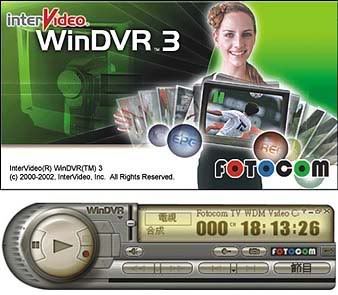
Turn your PC into digital video recorder and never miss your favorite shows. This TV viewing and recording solution features an Electronic Program Guide to search program listings, pause, rewind and replay functionality, and an intuitive Task Manager to schedule recordings. Plus, you can use WinDVR 3 to convert VHS tapes to DVD or video CD discs!
* TV Viewing & Fastest Recording solution
* Electronic Program Guide to search listings for favorite programs
* Convert VHS tapes to DVD or video CD discs
TV: You can pause, rewind and replay while watching live TV.
VCR: With an integrated EPG it is fast and easy to schedule programs for recording your favorite shows.
Task Manager
WinDVR 3's Task Manager is like having a personal TV assistant. The Task Manager handles the scheduling of programs you want to record, manages lists of files to be burned to disc and performs off-line transcoding jobs.
Screen Capture
WinDVR 3 lets you capture your favorite screen shots from any program you are watching. The shots are saved as a digital picture (Bitmap file) and stored on your hard drive.
Sleep Timer
WinDVR 3 lets you set up a sleep timer in case you doze off watching TV. Set up WinDVR 3 to turn off automatically after 30, 60, 90 or 120 minutes.
TV Viewing
* EPG (Electronic Programming Guide): InterVideo has integrated an EPG directly into WinDVR 3. We are proud to work with Decisionmark's TitanTV in the United States, Fast TV in Europe, and Sony IEPG in Japan. Each EPG lets you easily find your favorite shows and schedule them for recording or viewing with a single click.
* TV Standards: WinDVR 3 supports MPEG-1, MPEG-2, VCD NTSC, VCD PAL, SVCD NTSC, SVCD PAL, DVD NTSC and DVD PAL formats.
* Channel Surfing: The program displays video thumbnails of 16 channels at once to help you quickly scan what's on.
* TV Control: The TV Control in WinDVR 3 is just like the controls on a regular television. It has all of the standard functions like volume control, changing the channel, and more.
* Time-Shifting: Pause live TV, create your own instant replay, or fast-forward through commercials with Time Shifting and InterVideo Home Theater. Never again will you miss any of the action if you're called away from the TV.
* Initialization Wizard: This "wizard" walks you through the steps of initializing TV on your PC and also helps you start recording.
* Parental Control: WinDVR 3's Parental Control feature you can lock out channels you don't want them to view.
* Teletext: WinDVR 3 incorporates Teletext, a television information service in Europe that offers fun, facts and information 24 hours a day.
Recording Functions
* DV, VCD, SVCD And DVD Compatible File Output: WinDVR 3 lets you save your favorite shows as DV (digital video), VCD (video compact disk), SVCD (super video compact disk) and DVD files.
* Advanced De-interlacing And Noise Reduction: WinDVR 3 utilizes advanced de-interlacing technology for maximum compression efficiency and to remove the video artifacts that may appear when watching movies and TV shows on a computer screen.
* Unmatched Video Quality: InterVideo is known for the video quality of its software products, and that tradition continues in WinDVR 3 with
o Advanced De-interlacing
o Noise reduction
o Sophisticated Compression Algorithms
o Best audio and video synchronization
o Smooth, full frame rate video capture (at full resolution, 720x480 or 720x576)
o Best time-shifting quality in terms of video smoothness and synchronization
* World-class Video Encoder: WinDVR 3 offers the best video encoder available for video recording. Our proven technology guarantees that you will always get the best picture quality when recording video in real
Download
http://rapidshare.com/files/97689458/WinDVR.rar

|
|
|
|
|
|
| |
There have been 35938 visitors (91325 hits) on this page! |
|
|
|
|
|
|
|